






Solicitar el presupuesto de una pieza a medida no debería ser complicado. Si ya tiene un plano o un archivo 3D listo, el sistema de presupuestos online de Yijin Solution le ofrece una forma más rápida de consultar precios, ajustar requisitos y pasar al pedido.
Esta guía repasa los pasos principales, desde la carga de un archivo y la revisión de un presupuesto hasta la actualización de configuraciones, el pago y la gestión posterior de los pedidos en su cuenta.
Tanto si busca una única pieza a medida como si prepara un pedido recurrente, este artículo le ayudará a entender cómo funciona la plataforma y qué puede esperar en cada etapa.

Primeros pasos
Para utilizar la plataforma sin problemas, lo mejor es abrirla en un navegador basado en Chromium, como Chrome o Edge.
Abra el sistema de presupuestos aquí:
https://yijinsolution.com/contact/

Una vez en la página, puede cambiar el idioma de visualización con el botón de idioma situado en la esquina superior derecha.
Obtén una cotización instantánea
Suba su archivo
Para iniciar un presupuesto:
- Haga clic en Presupuesto inmediato
- Seleccione el archivo que desea presupuestar
- Haga clic en Abrir
El sistema cargará su archivo automáticamente y comenzará a procesar el presupuesto.

Esperando el cálculo del precio
Una vez completada la carga, el sistema calculará el precio automáticamente.
Cuando el precio esté listo, introduzca su dirección de correo electrónico para iniciar sesión y ver el presupuesto.
- Si ya tiene una cuenta, introduzca su contraseña para iniciar sesión.

- Si es un usuario nuevo, siga las instrucciones en pantalla para registrarse primero y, a continuación, inicie sesión para ver su presupuesto.

Confirmar las condiciones de control de exportación
Antes de pasar al siguiente paso, lea atentamente las condiciones de control de exportación. Según la situación de su producto, seleccione la opción aplicable y haga clic en Confirmar.

Revisión del presupuesto inicial
Por defecto, el sistema facilita un presupuesto basado en un producto único y calcula el precio según el plazo de entrega más largo.
Si el sistema no puede generar un presupuesto automático para su producto, le guiará hacia el proceso de presupuestación manual. En ese caso, solo tiene que esperar a recibir una respuesta por correo electrónico.

Personalice su presupuesto
Cambiar plazo de entrega y envío
Si desea ajustar el calendario de entrega, puede modificar el número de días de entrega. El sistema actualizará el precio automáticamente.
Para estimar el coste de envío:
- Seleccione un proveedor logístico
- Introduzca su dirección de envío
El sistema calculará automáticamente el coste de envío.

Editar configuración del producto
Si desea modificar detalles del producto, como la cantidad, o añadir opciones de acabado superficial, haga clic en Editar configuración para acceder a la página de configuración.
Después de hacer sus cambios, haga clic Guardar configuración. El sistema recalculará el precio automáticamente.

Pago y programación de la producción
Si está satisfecho con el precio presupuestado, haga clic Continuar al pago para pasar a la página de pago.

En la página de pago, el proceso suele seguir estos pasos:
- Introduzca la dirección de envío
- Confirme las condiciones de control de exportación
- Pago online completo

Una vez completado el pago, el sistema envía automáticamente el pedido a fábrica para programar la producción.
También puede hacer clic en Descargar en la esquina superior derecha para descargar los detalles del pedido en Formato PDF.
Iniciar un nuevo presupuesto
Si ya ha iniciado sesión, haga clic Iniciar nuevo presupuesto y seleccione el archivo que desea subir.
A continuación, seguirá el mismo proceso descrito en la Obtén una cotización instantánea sección.

Funciones de la página de inicio
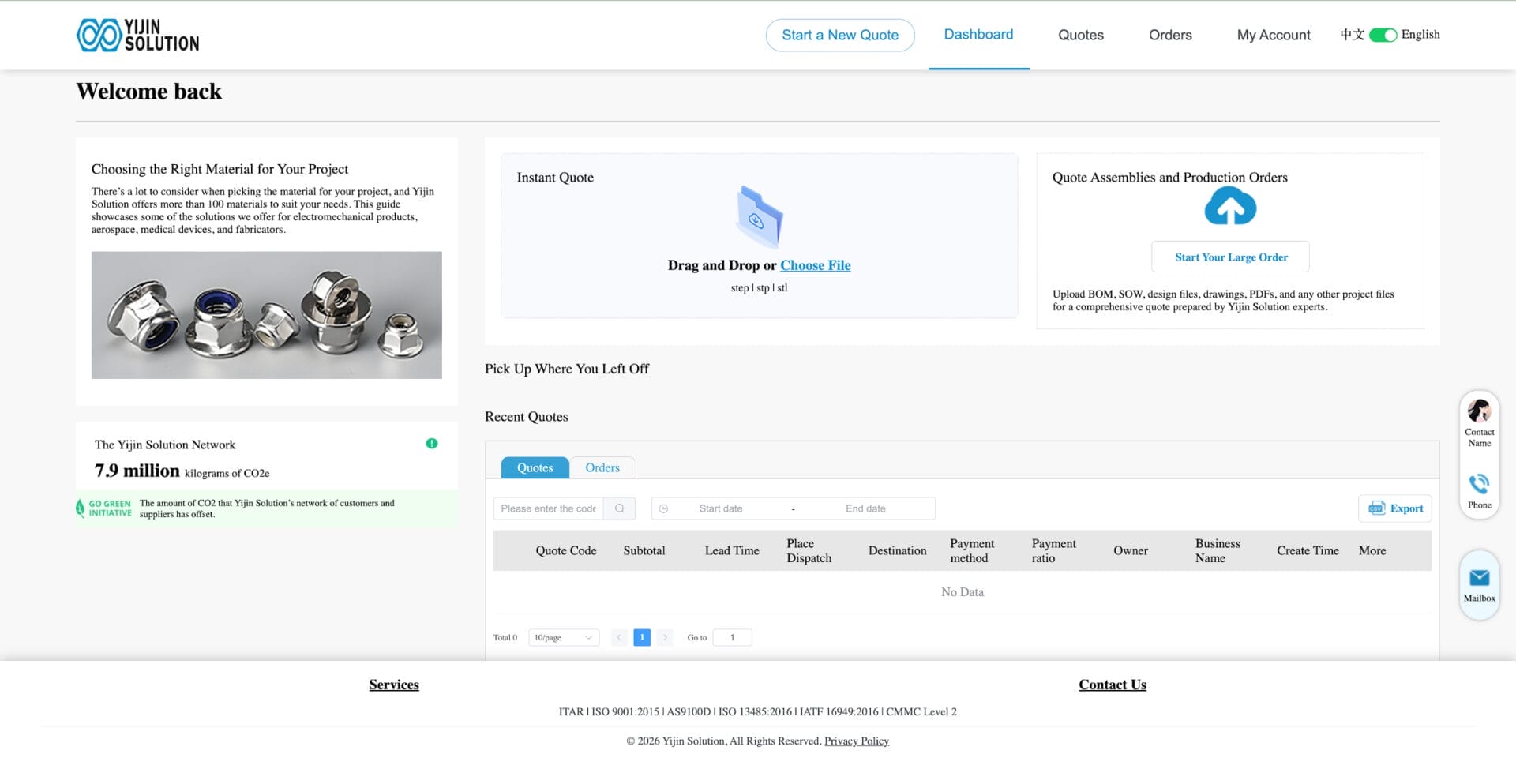
Haga clic en Panel de control en la parte superior del sistema para volver al panel principal.
La página de inicio incluye dos opciones principales de presupuesto:
- Presupuesto instantáneo de piezas
- Presupuesto para pedidos de montaje y producción
Haga clic en cualquiera de las dos opciones para acceder al proceso de presupuesto guiado.

On Presupuestos recientes de la página de inicio, también puede consultar sus presupuestos recientes. Desde ahí, puede:
- Ver detalles del presupuesto
- Continuar con un presupuesto
- Acceder a pedidos relacionados
En el Presupuestos área, haga clic Más para gestionar el presupuesto actual. Las acciones disponibles pueden incluir:
- Editar
- Realizar un pedido
- Descargar
- Eliminar
En el Pedidos área, puede consultar los detalles del pedido en la sección de gestión de pedidos.
Tenga en cuenta que solo pedidos de presupuesto de pago pasará al área de gestión de pedidos.

Presupuestos
En el Presupuestos podrá gestionar todos sus registros de presupuestos en un solo lugar.
Las acciones disponibles incluyen:
- Ver información del presupuesto
- Exportar datos del presupuesto
- Editar o actualizar los datos del presupuesto
- Convertir un presupuesto en pedido
Una vez que genere un pedido a partir de un presupuesto y complete el pago, el sistema creará el pedido automáticamente.

Pedidos
En el Pedidos sección, puede gestionar todos los pedidos personales y consultar el estado actual de cada pedido en cualquier momento.
Buscar pedidos
El sistema permite filtrar pedidos por:
- Código de presupuesto
- Intervalo de tiempo
- Otras condiciones de búsqueda disponibles
Así resulta más fácil encontrar un pedido concreto rápidamente.
Exportar detalles del pedido
Puede exportar los detalles del pedido como Archivo PDF con un solo clic.

Mi cuenta
En Mi cuenta sección le permite consultar y gestionar la información relacionada con su cuenta.
Consulta de hoy
Puede consultar todos los presupuestos creados hoy.
Subir consulta
En la sección de presupuesto con carga de archivos, puede subir directamente planos o archivos para solicitar un presupuesto.
Archivo perfecto
Puede consultar y actualizar sus datos personales aquí.
Comentarios sobre la plataforma
Si experimenta cualquier inconveniente al utilizar la plataforma, puede enviar sugerencias de mejora a través de la sección de comentarios.

Consejos para agilizar el proceso de presupuesto
Para que el sistema procese su presupuesto con mayor eficiencia, se recomienda:
- Utilice un navegador compatible como Chrome o Edge
- Suba archivos de diseño claros y completos
- Verifique de nuevo la configuración del producto antes de guardar
- Revise con atención las opciones de envío y plazo de entrega antes de finalizar la compra
- Complete el pago con prontitud si quiere que el pedido pase a la planificación de la producción
Conclusión
El sistema de presupuestos online de Yijin Solution está diseñado para que el aprovisionamiento de piezas a medida sea más directo, desde la carga del archivo hasta el precio y la realización del pedido.
Una vez que conozca el flujo básico, resulta mucho más fácil comparar configuraciones, gestionar registros de presupuestos y hacer avanzar los proyectos sin idas y venidas innecesarias.
Si ya tiene un archivo listo, puede Empezar con un presupuesto instantáneo y consulte los siguientes pasos a partir de ahí.
Volver arriba: Cómo usar la plataforma de presupuestos online de Yijin Solution | Guía del usuario