


CNC machining costs come down to four levers a buyer can actually influence: machining time, material cost, setup time, and design complexity. The largest gains rarely come from negotiating the quote. They come from CAD-stage decisions made before the part is ever loaded onto a machine. Boothroyd Dewhurst, the originator of the DFMA methodology, estimates that around 70 to 80% of manufacturing cost is locked in during design.
What follows are 12 practical tips engineers and procurement teams can apply to lower per-part cost without giving up function or tolerances, grouped by design decisions, ordering strategy, and supplier selection
How are CNC Machining Costs Calculated?
CNC part cost breaks down into four variables that a buyer can influence: machining time, material cost, setup time, and design complexity. Each feeds into the quote differently. Understanding how they interact is what makes targeted cost reduction possible.
| Cost Driver | What You Control |
|---|---|
| Machining time | Simplify geometry, reduce setups, design for 3-axis where possible |
| Material cost | Choose aluminum or engineering plastics when performance allows |
| Setup time | Combine features into fewer clamping positions |
| Tolérances | Apply tight tolerances only to functional features |
| Finition de la surface | Specify as-machined finish unless a functional need exists |
| Part complexity | Reduce undercuts, thin walls, and deep cavities |
| Order volume | Batch orders to distribute setup costs across more parts |
Machining time is the biggest cost variable
Hourly rates for 3-axis CNC centers typically fall between $50 and $150, depending on equipment, region, and operator cost. Five-axis centers run higher, often $100 to $300 per hour. Every minute saved in cycle time reduces per-part cost directly. Five-axis setups commonly add 60 to 100% to machining cost compared with 3-axis work on the same part.
Setup time is the hidden cost in low-volume orders
Setup cost is fixed per production run, regardless of quantity. For a five-part order, setup might represent 40 to 60% of total cost. For a 500-part order, the same setup is a rounding error. This ratio matters when buyers are choosing between a small test run and a slightly larger batch.
Design complexity and tolerance requirements
Complex geometry means more tool paths, more setups, and potentially a 5-axis machine instead of a 3-axis. Tight tolerances mean slower cutting speeds, more inspection steps, and higher scrap rates. Both add cost. The tips below show how to manage each one.
Material Selection: The First Cost Lever
Material choice affects two cost lines at once: the price of the raw stock and the time it takes to cut. Switching from aluminum to titanium does more than raise the material line item; it slows feed rates, accelerates tool wear, and increases cycle time. Depending on the material pairing, the total cost can shift by three to five times before a single tool path is programmed.
The table below compares common CNC materials by machinability, achievable tolerance, and typical use. For most precision parts where the design allows it, Aluminium 6061 remains the lowest-cost starting point because it cuts quickly, accepts standard tooling, and is widely stocked.
| Matériau | Usinabilité | Best Tolerance | Typical Use Case |
|---|---|---|---|
| Aluminium 6061 | Excellent | 0.01 mm | Enclosures, brackets, aerospace |
| Aluminium 7075 | Bon | 0.01 mm | High-strength aerospace parts |
| Laiton C360 | Excellent | 0.01 mm | Fittings, connectors |
| Acier inoxydable 304 | Modéré | 0.02 mm | Medical, food-grade parts |
| Acier inoxydable 316L | Modéré | 0.02 mm | Marine, high-corrosion environments |
| Titanium Grade 5 | Difficult | 0.02 mm | Aerospace, medical implants |
| ABS / Nylon | Excellent | 0.05 mm | Prototyping, housings |
| PEEK | Bon | 0.05 mm | High-temp medical and industrial |
Disclaimer: Tolerances shown are achievable ranges and depend on part geometry, feature size, and machining strategy. Confirm against the specific part during quoting.
12 Ways to Reduce CNC Machining Costs

The 12 tips below are grouped by project stage: design decisions made in CAD, ordering strategies controlled at quoting, and supplier choices that affect long-term cost.
Group A: Design tips
Tip 1: Add radius to internal corners
CNC milling tools are cylindrical, so they naturally produce rounded internal corners. Specifying sharp internal corners forces a smaller-diameter tool, which means slower speeds, more passes, and longer cycle time.
As a starting point, internal corner radii of about one-third of the cavity depth give the tooling more room to work, although the right ratio depends on material and tool selection. Using the same radius across all internal edges also eliminates tool changes mid-operation, which saves additional minutes per part.
Tip 2: Limit cavity depth
For most CNC milling operations, a cavity depth of about three to four times the tool diameter is a practical limit. Deeper cuts require longer, less rigid tools that vibrate, reduce accuracy, and increase machining time.
A 12 mm end mill, for example, performs well up to depths in the 36 to 48 mm range. Anything deeper than four times the feature’s largest XY dimension typically needs specialty tooling or a multi-axis approach. If deep cavities are structurally necessary, a split-part design assembled after machining is often the cheaper route.
Tip 3: Thicken thin walls
Thin walls flex during machining. The mill has to reduce the feed rate and take multiple light passes to prevent deformation or fracture. For aluminum parts with typical aspect ratios, walls thinner than around 0.8 mm drive up cost. For steel, around 1.0 mm is a common practical threshold.
Plastics are more forgiving in some respects but still benefit from around 1.5 mm minimum for stable cutting. The actual minimum depends on aspect ratio, feature size, and plastics cutting strategy. Unless weight is the primary design constraint, increasing wall thickness reduces machining time and improves dimensional consistency.
Tip 4: Apply tight tolerances only when function demands
Standard CNC tolerances of around 0.1 to 0.2 mm cover most non-mating features with no cost premium. Tightening to 0.01 mm requires slower cutting speeds, additional inspection steps, and higher scrap-management overhead.
Apply tight tolerances per ASME Y14.5 only to mating surfaces, locating features, and safety-critical dimensions. A 0.05 mm precision band is enough for most functional features at a noticeably lower cost.
Tip 5: Standardize hole sizes and thread specifications
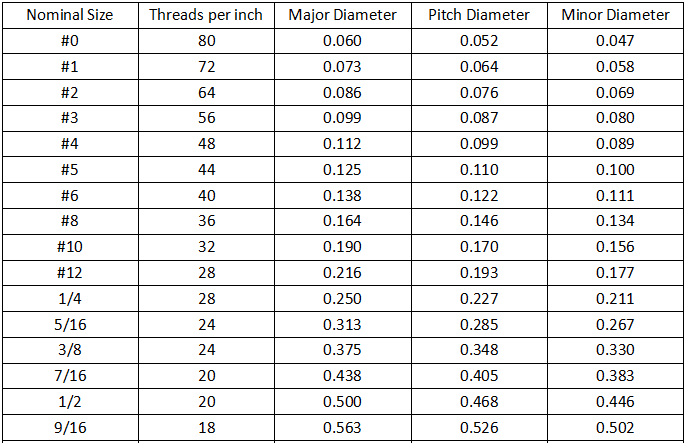
Non-standard hole diameters require custom drill bits or bore finishing, both of which add cost and lead time. Standard metric drill sizes such as 3, 4, 5, 6, 8, and 10 mm are stocked at every competent shop. For holes up to 10 mm, designing in 0.1 mm increments is safe. Above 10 mm, 0.5 mm increments are the safer practice.
Standard thread forms such as M-series metric or UNC/UNF imperial can be cut with off-the-shelf taps. A custom thread pitch means custom tooling, which adds setup cost on every run.
Tip 6: Minimize undercuts and complex features
Undercuts require specialty tools or additional setups to machine from a different angle. Each additional setup adds cost. A typical setup on a mid-size CNC center can add $50 to $150 to the job, depending on the machine and operator.
Where possible, redesign undercuts as chamfers or angles accessible from the primary machining direction. If an undercut is functionally necessary, raise it during the DFM review. A two-piece design sometimes eliminates the cost entirely.
Tip 7: Simplify surface finish requirements
An as-machined surface finish of around Ra 1.6 to 3.2 µm costs nothing extra. It is the natural output of milling or turning. Anodizing, bead blasting, polishing, and other secondary finishes add both time and cost.
Specify premium finishes only for surfaces that need them functionally or environmentally: corrosion resistance, wear surfaces, or visible faces. Applying a premium finish to every surface on a part is one of the most overlooked sources of unnecessary cost in CNC orders.
Group B: Ordering and process tips
Tip 8: Batch orders to reduce per-part setup cost
Setup time is a fixed cost allocated across all parts in a run. A 45-minute setup costs the same whether the run is five parts or 50. Increasing the order quantity distributes that fixed cost and often reduces the unit price significantly.
Many CNC suppliers offer per-part pricing improvements at common volume thresholds, typically around 50, 200, and 1,000 or more units. Requesting pricing at multiple quantity tiers when quoting often shows a larger cost gap between 20 and 100 parts than buyers expect.
Tip 9: Design for fewer setups
Every time a part is repositioned or flipped in the machine, that is an additional setup. Each setup adds time, and each repositioning introduces a small alignment tolerance stack-up. Parts designed for a single 3-axis setup are consistently cheaper than those requiring 3+2 or full 5-axis approaches.
Design key features so they can be machined from one or two orientations. When multi-axis work is unavoidable, 3+2 indexed machining is less expensive than continuous 5-axis because it uses a simpler toolpath strategy.
Tip 10: Choose the right stock size to minimize material waste
CNC machining is subtractive, so you pay for the full stock blank, not just the finished part volume. Designing a part that fits inside a standard stock size, such as 50 mm by 50 mm by 100 mm bar stock, avoids buying and machining down an oversized blank.
Confirm available standard stock sizes with the supplier before finalizing part dimensions. Minor adjustments to the outer envelope, even a few millimeters, can reduce blank cost meaningfully without affecting part function.
Group C: Supplier and strategy tips
Tip 11: Use DFM review before finalizing your design
Design for Manufacturability (DFM) review is a collaborative process in which the supplier’s engineers review CAD files before production begins. It surfaces features that are expensive to machine: unnecessarily tight tolerances, non-standard holes, undercuts that require extra setups, and similar cost drivers.
The reviewer recommends changes that reduce cost without compromising function. Changes made at the DFM stage are the least expensive to implement in the entire production cycle. A supplier that offers DFM review at no charge as part of quoting reduces the friction of running it on every project.
Tip 12: Work with a direct manufacturer where possible
Sourcing through a broker adds a margin layer between the buyer and the factory. Direct manufacturer relationships give buyers visibility into the actual production process, faster DFM feedback, and pricing that reflects real factory economics.
The cost difference shows up most clearly in repeat or volume work, where margin layers compound. Brokers can still be useful for one-off projects or for buyers managing dozens of small-volume parts across many process types; the value proposition is logistical, not economic.
Which Tips Should You Apply First?
Not all 12 tips carry equal weight. The right starting point depends on where the project is in the cycle.
If you are still in the design phase
Start with Tips 1 through 7. Design-phase changes are free to implement and have the highest cost impact. Tip 4 (tolerances) and Tip 5 (standard holes) surface the largest avoidable cost in early-stage designs. A DFM review before finalizing drawings catches issues across all 12 tip categories in one pass.
If you have a finalized design
Focus on Tips 8 through 10: order strategy and stock sizing. These can still reduce cost without touching the CAD file. Consider Tip 12 as well, since switching to a direct manufacturer can lower cost even with no design changes. Ask the supplier to flag design features driving disproportionate cost; even a locked design often has small adjustments that are still possible.
If you are scaling from prototype to production
Revisit all design tips. What was acceptable for a five-part prototype run may be unnecessarily expensive at 500 units. Apply Tip 8 aggressively. Batch size has a compounding effect at scale because setup costs amortize faster while per-unit material costs stabilize. Run a fresh DFM review at the transition point to re-optimize before committing to production tooling and process plans.
Reduce CNC Machining Costs with Yijin Solution
Cost reduction in CNC machining is almost always a matter of catching design and ordering decisions before they are locked in, which is why DFM review repays the time it takes more reliably than supplier negotiation.
At Yijin Solution, our Services d'usinage CNC sur mesure include a free DFM review on every quote. Because we run our own facility in Shenzhen, feedback on cost drivers comes from the engineers who will actually machine your part.
Upload your CAD files for a quote and DFM feedback within 24 hours.
FAQs on How to Reduce CNC Machining Costs
What is the typical lead time for CNC machined parts?
CNC lead time depends on part complexity, material availability, and finishing requirements. Prototypes from stocked material commonly ship in 3 to 7 working days. Production runs of 50 to 500 units typically take 2 to 4 weeks. Specialty materials or finishes such as anodizing, plating, or heat treatment can add 1 to 2 weeks to the schedule.
Is there a minimum order quantity for CNC machining?
Most on-demand CNC suppliers accept orders from a single prototype upward, with no formal minimum order quantity. At quantities of 1 to 5, setup dominates per-part cost, so the unit price looks high. At 50 to 100 or more units, per-part pricing becomes more competitive. For fit testing only, a sample of 1 to 5 parts is reasonable and standard practice.
What CAD file formats can I send for a quote?
Most CNC suppliers accept STEP and IGES as universal 3D formats, plus native files from SolidWorks, Inventor, and Fusion 360. Two-dimensional drawings in PDF or DWG should accompany 3D files when tolerances, surface finish, or threads need to be specified. STEP is the most reliable format for quoting because it preserves geometry across CAD platforms without translation errors.
Can I get inspection documentation with my parts?
Yes, most precision CNC suppliers can provide First Article Inspection reports, material certificates, and dimensional inspection records on request. FAI reports matter most for first-time production parts. Material certificates are required for regulated industries such as aerospace and medical. Full dimensional reports are standard for safety-critical features. Documentation requests should be made at the quoting stage, not after production is complete.
How do I protect my design when sending CAD files overseas?
Most established CNC suppliers will sign a non-disclosure agreement before reviewing CAD files. Ask for the NDA in writing before sharing files, and confirm the supplier has secure file handling. For highly sensitive designs, consider sharing files in stages: external geometry first, full internal features only after the NDA is in place. Reputable manufacturers in the precision machining space treat IP protection as standard operating procedure.
Retour en haut de la page : How to Reduce CNC Machining Costs: 12 Design and Process Tips






 English
  Spanish
  German
  French